Subtract
Cut the last part you pick out of the others. Each stays an object of its own, and the cutter can be kept to use again.
Windows 10 / 11 · portable · free
A lightweight, portable 3D modeler for everyone on Windows: drop in shapes, enter exact sizes in any unit, cut and combine them, and save or export a watertight file ready for printing.
No learning curve.
No cloud.
No account.
No installer.


Enjoy a full workshop of tools: cut and join, mend and rebuild, mold, texture and measure — each one a click away.

Cut the last part you pick out of the others. Each stays an object of its own, and the cutter can be kept to use again.
Keep only the volume where two or more parts overlap.
Fuse two or more parts into one solid.
Cut a part in two with a plane, or along a face you pick.
Cut a part too big for the plate into two halves that fit back together one way only: pins in holes, or pegs in sockets.
Read the guide →Add pins or pegs through the face where two parts meet - a floor on its basement, two blocks side by side - so they fit one way only.
Read the guide →A screw hole - plain, countersunk or counterbored, with a nut pocket if you want one - or a pocket for a heat-set insert, M2 to M8. Cut into the part, or made as a cutter.
Keyhole slots to hang a part on a wall: click the back face and drag them into place. Printed wall studs and a drilling template if you want them.
The older way to put one pattern - brick, tiles, planks, grain - on one flat face. Texture does all this and more; Studs stays for models made with it.
Mend a model that would not print: fill holes, drop slivers, turn faces the right way round.
Read the guide →Rebuild the surface: keep the shape and drop the points that add nothing, or start from scratch to mend anything, even a model that passes through itself, at the cost of fine detail.
Read the guide →Repeat a part along a line or round a circle, growing as it goes: a flight of steps, a row of dowels, a ring of pins, a spiral stair.
Cut a model at a height and run its outline straight down to a flat base - for a ragged scan, a relief or a tilted part.
Wrap the selection in one tight skin: two cylinders become a slot, a row of spheres a rounded bar.
A silicone mold that comes apart: split at the widest section, keyed, with a pour hole and air vents.
Read the guide →Turn a solid into a web of struts: an openwork lamp or vase, or a light lattice that is still stiff.
Read the guide →Lay small parts out in rows inside a model kit’s frame of runners, each held by thin gates to snip off after printing.
Read the guide →Hold down the corners that lift: tabs on a part’s sharp corners, gated thin at its foot, out to a frame or to pads, to snip off after printing.
Read the guide →Fourteen patterns for any face - knurling, brick, roof tiles, rubble wall, bark, wood grain - laid flat on it or wrapped round a barrel.
Read the guide →Brick, stone, siding and log walls built the way the real thing is: whole corner bricks, cornerstones, posts over the boards.
Read the guide →Point at a face to see it highlighted; click to read its middle, direction, size and area, lay the part on it, or clone it as a thin solid.
Measure how far two parts overlap, or the gap between them, without changing either.
Click two points to measure between them, then drag either end to move it.
Making a shape, changing it, and putting it where it belongs — the Insert, Edit and Align tabs.

Nine primitives, a Custom shape with its size, segments and roundness chosen first, and the way in for anything made elsewhere. Every shape lands on the plate at a sensible size and takes the next color in a cycle, so a scene stays legible without anyone painting anything. Text makes lettering as an object of its own, in any installed font — flat, or bent around a circle or a cylinder. Sketch draws your own outline on the plate — lines, arcs, curves, freehand, rectangles, circles, or an SVG loaded in — and extrudes or revolves it into a solid. While you draw, the pointer’s X and Y are read off the axes and every line carries its length; a right-click finishes it. Import reads STL, OBJ and 3MF, and SVG drawings as solids; another 3DFastCraft project joins the plate rather than replacing it.
The Library (Advanced mode) holds the parts made to your numbers — boxes, hinges, fasteners, gears, windows, roofs, lithophanes, and the Fit test plates that find the tolerance brick studs need. See below.
On the plate: the nine primitives, each in the next color of the cycle, set out in rows 10 mm apart by Distribute.


Click the point a part turns and is measured about - a shaft hole, a corner, a hinge line - instead of the middle of its box. Saved with the project; Pivot to center puts it back.
Read the guide →Round the edges of a cube or cylinder that has not been cut or reshaped since it was inserted.
Turn a shape about its upright axis by more the higher up it goes - twisted columns, vases and spirals. The bottom stays put.
Narrow or widen a shape toward the top - tapered columns, spires, flared vases. The bottom keeps its size.
Curve a shape over as if round a pipe, toward X or Y - arches, horns, hooks. The bottom stays put.
Cut the triangle count of a dense import down while keeping the shape.
Round the facets off, with the result shown as you set it.
Move every face out or in by the same distance rather than scaling - walls thicker or thinner, gaps narrower or wider, corners still sharp. Leave Z out to keep the height.
Cut a part back round its outer edge only, so an insert fits inside other walls while its partitions keep their thickness.
Turn a solid into a shell with walls as thick as you choose, to save material.
Fill what the part would hold if liquid were poured in from above, to a level - as a solid, or as a part of its own that fits the inside exactly.
Read the guide →
Set the selection down on the plate, so it stands on it rather than floating over it.
Move the selection straight down until it rests on whatever is under it. Hold Ctrl and it sinks 0.2 mm in, ready to Merge.
Pick a face and the part tips over to stand on it - flat side down, for printing. Every face it can rest on is marked.
Rank every way up the part could print - support, height, footprint, stability. Hover to preview, click to stand it there.
Center the first part you pick on the second. Nothing is turned or resized.
Stand the selection against a face you click, or on the middle of a hole, round or square, on whichever axes you choose.
Read the guide →Put the middle of one face on the middle of another - a lid on its opening - and read both sizes and the gap. Round faces line up by their axis.
Shrink a part too big for the bed to fit inside it, 20 mm from the edge, and center it on the plate. Never enlarges.
Set a selection out in rows across the plate, a gap you choose apart - each turned onto its best face and dropped to the plate if you like, ready to print.
Reflect the selection across an axis. Several parts are mirrored as one, so they change sides.
Left, Center, Right and Spread on each axis: flush either side, centered, or the gaps evened out. With several selected the others move to match the last picked; with one it goes to the plate’s edge or middle.
Saving, exporting and looking at your work, and a tab of your own — the File, View and Custom tabs.

Keep a named snapshot inside the project file, each with a small picture, and restore any of them later.
Read the guide →Every step taken in the project, kept as you work if the .3dfp project file is enabled. Look back at one, go back to it, or restore one object alone as it was.
Read the guide →Notes kept in the project, and a summary of what is in it.
Export the selection, or everything when nothing is selected, for any slicer.
Front, top and right views and an isometric, with dimensions - to print or save as PDF.
Save every undo step since the plate was empty, one file each, as a project or an STL.
While on, saves a screenshot after every action - and one just before each Apply - to a folder you choose.
Nozzle, layer and the fits the tools start from, kept for each printer, with a test print to find them.
Read the guide →Every key the app answers to, and the drags worth knowing. Press F1.

Frame everything, or look from the top, front, right, back, left, bottom or at an angle - most on a number key.
No perspective: parallel edges stay parallel and sizes read the same near and far, for lining things up.
Draw every triangle edge, to see how dense an import is.
Fade everything not selected, to see parts hidden inside others. During a tool, the rest shows see-through.
Mark the faces steeper than the overhang angle - what the slicer will support. The angle and color are yours to set.
The printable area, how the plate is drawn, and how the scene is lit.
Read every box in mm, cm, m, inches or feet, and see what a model drawn at 1:87 or 1:160 comes to - HO, N, G and more by name. Models are still stored in millimeters.

Gather the buttons you use most in one place: right-click any button on another tab and add it here, or press Add. Right-click one here to move or remove it.
Beside the view, everything about what is selected: the parts on the plate, how they are grouped, and their exact numbers.

Keep parts together in the objects list while they stay separate objects. Click the assembly’s name to select them all; Reassemble puts them back where they are now.
Combine the selection into one object, or split it back into its pieces. With an assembly picked, Ungroup dissolves it and leaves its parts as they are.
While on, a part moves by dragging only in Move, so turning or resizing it never shifts it by accident. Its rings and handles still work.
Clicking an object adds or removes just that one, leaving the rest selected. Select all, Deselect and Invert sit beside it.
Every part by name and color. Hide one and it is not drawn, picked or exported; lock one and it stays in view but cannot be picked. Filter the list, or fold it by assembly.
Paint a part in one click from the palette. Filament says which slot prints it on a multi-material printer, Plate which build plate, for a model printed in more than one go. Both are saved in the 3MF.
Exact numbers for where a part is, how big and how it is turned, in any unit. Type a value, or +=5 and -=5 to change it by that much; with Each on, every selected part gets it.
Parts made to your numbers. Pick one from the catalog on the Insert tab (Ctrl+L), set its sizes with the preview standing on the plate, and insert it. The part remembers how it was made — select it later and Edit settings makes it again where it stands. Walls and fits start from your printer’s nozzle, layer and clearance, and every setting either makes a sound, watertight part or says plainly, in red, why it cannot. More than forty generators in nine groups.
The tools that work on a face, and what the File tab keeps. Click any of them to see it large, with what it shows.


One self-contained file. No installer, no .NET runtime, no account. Download it, double-click it.
Windows SmartScreen will object the first time — the executable is not code-signed. More info → Run anyway.
SHA-25603ddd5fc3ebfb81d1ae049ae5f9584786da28861d845a99494faac62d8f24bfa
Also new in 4.9: Corner tabs that hold down the corners that lift, sliding and single-hung windows glazed each sash to its own level. In 4.8: a project file and its history, a plate for each object and export by plate, Kit sprue, right-click menus, light you can set. In 4.7: .NET 10, a tidier Surface panel, a crash report that says what went wrong. In 4.6: Rebuild that keeps the shape, Grow and Shrink, Trim, a face cloned as a thin solid, Measure that snaps and chains, an orthographic view, a start page. In 4.5.3: Mirror reflects a selection as one, so parts change sides. In 4.5.2: a type for the Window with muntins, an architrave and shutters, Align to face on the middle of a hole, and a guide page for each of ten tools. In 4.5.1: every pattern shown flat and in 3D, siding and stone with no groove, a small picture with each saved version. In 4.5.0: a Custom tab for the buttons you use most, Extended mode folded into Advanced, the pointer’s X and Y read off the axes while you sketch. In 4.4: textures with no seam, assemblies, arched doors, dormers as parts of their own. In 4.3: projects are 3MF files, Esc in number boxes. In 4.2: printer profiles and their test print, Fill up, Library parts resized on the plate, number boxes that take +=5. In 4.1: the Library with working models, lithophane lamps and the moon, keyholes, pictures embossed, and the app in American English.
It began as a replacement for Microsoft 3D Builder, which Microsoft retired: the same short path from a shape on the plate to a printable part, with almost nothing to learn first. It then grew well past it — a parts library, working mechanisms, molds, patterns, lithophanes.
The Classic view shows the tools 3D Builder had, for anyone who wants the old app back; Advanced has every tool. Almost all of it is written by Claude Code from prompts.
Testers and contributors are welcome — bug reports, models that break something, and patches. See the issues and how to contribute.
01 / 19
3DFastCraft 4.8 with a model house on the build plate, its tiled roof lifted off to show inside: brick walls, a bow window, the veranda, the basement and its stair - each its own part, in its own color. The window frame is selected, its arrows ready to move it; beside it the object list, with the parts hidden for now in grey, and the frame's color, filament and plate.

02 / 19
Each element of this 1:87 house was made with 3DFastCraft’s own tools — the walls and their siding, the windows and doors, the stairs, the chimney and the tiled roof — each a part of its own, in its own color, lifted apart here to show the floors inside.

04 / 19
The first draft, printed and set on a model railway layout. It still needs some adjustments.

05 / 19
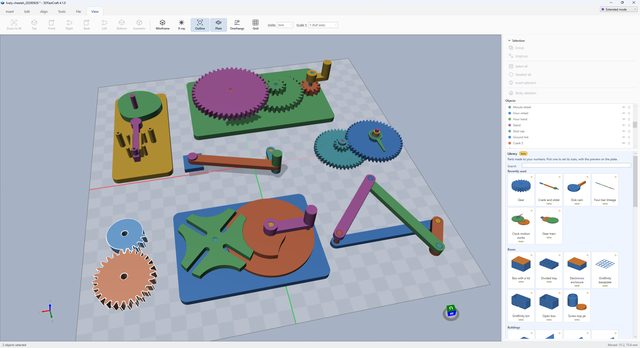
Every mechanism in the Library made as a working model to print and turn by hand: a gear train and clock motion works on their bases, a Geneva drive stepping a slotted wheel, a four-bar linkage, a crank and slider, a pair of gears in mesh and loose spur gears. Each gear is keyed on a D-shaft that turns around in its bearing and flat where it drives, with a crank or a handwheel to turn it. Turn it plays the motion on the plate before anything is inserted and stops, in red, at the first jam. The Library panel on the right keeps the parts used last at the top.

06 / 19
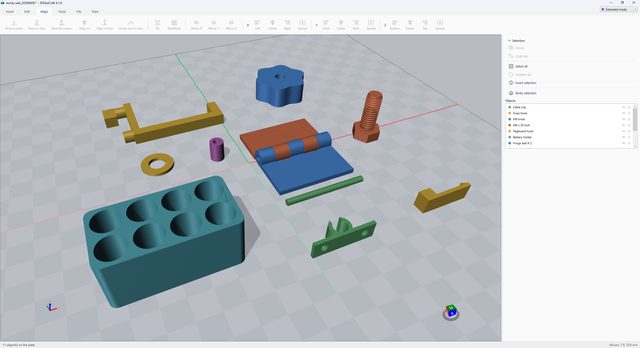
An M8 × 20 bolt, a star knob with a pocket for an M6 nut, a washer to ISO 7089, a spacer, a knuckle hinge with its pin printed separately, a snap-fit hook and its catch, a cable clip, a pegboard hook and a holder for eight cells. Threads are ISO metric, cut as a die cuts them, with a clearance so printed parts screw together; fits start from the nozzle, layer and clearance set for your printer.

07 / 19
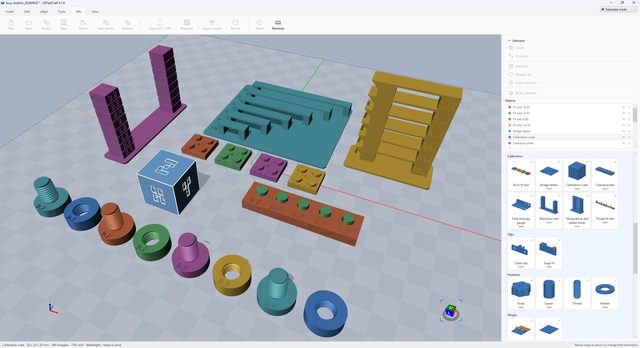
Prints that tune the printer, each labeled in the print itself: the 20 mm calibration cube with X, Y and Z on its faces, a temperature and speed tower in numbered bands, a pair of retraction towers, a bridge ladder of growing spans, a clearance plate of pins printed in place in their holes, brick fit test plates at four fits, and bolt and nut pairs at a run of thread clearances. Whatever fits best goes back into the app as the number to use.

08 / 19
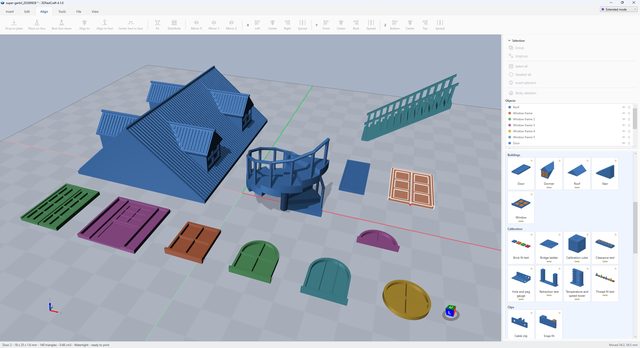
A model house roof with three dormers merged into its slopes and tiled like the roof, a spiral stair with its handrail, a straight flight with a balustrade, and windows and doors: arched, round, half-round and rectangular windows, a paneled door and double glazed doors. Sizes are typed as the model is drawn and read back at its scale - set 1:87 and a door says how tall it would be for a person to walk through.

09 / 19
A cylinder standing on a cube, and the pegs that will join them: Connect objects finds the level face the two share - 0.36 mm apart here - and plans connectors through it, shown in blue before anything is cut. Separate pins, pegs on one half or brick studs; round or square; how many, their diameter, depth, clearance per side and distance from the edge. Both parts are kept, each as itself, and they go together one way only.

10 / 19
A pyramid cut by a level plane 5.84 mm up, the lower half given brick studs and the upper half the underside that grips them, so the halves press together and hold. Drag the plane or type its offset; separate pins or pegs are the other choices. The fit comes from the Brick fit test in the Library, and the cut face can be closed over.

11 / 19
A PNG of a dog traced into outlines - the dark parts, with the threshold at 0.58 - and cut 0.8 mm into the face of a pyramid, 16 mm tall. The handles on the face move and turn it; the corner squares resize it along the surface. Planar or wrapped around a curve, raised instead of cut, repeated across the face, or kept as a part of its own to print in a second filament. SVG drawings and lettering in any installed font are embossed the same way.

12 / 19
Two keyhole slots side by side in the back of a box, 32 mm apart, for screws with 8 mm heads: the head goes in the round end and the part drops down the slot onto the screw. Drag the handles to place them, set them one above another instead, and add printed wall studs and a drilling template if wanted.

13 / 19
A pin to be set on the hub of a gear. Click a face on any object, then for X, Y and Z choose a place on the face - its near edge, middle or far edge - and the point of the selection that goes there. The red marker is the place on the face, and the selection moves as one; nothing is turned or resized.

14 / 19
The side of a pin, then the wall of a hole: a round face is taken whole, by its axis, so Apply puts the pin on the hole's axis - turning it parallel first if asked - and the panel reads both diameters and the gap between them. Here a 5 mm hole in a cam has been picked; the pin goes into it next.

15 / 19
A plain box turned into an openwork basket: 120 cells, struts 1 mm thick, built on a 0.333 mm voxel grid so the result is watertight, with 57% of the material kept. Also the resize strip at the bottom - in millimeters or percent, with a switch - and the corners of the selection box, which resize in proportion when dragged.

16 / 19
Point at a face and it lights up; click and it is read: which object, the middle of the face, which way it faces and its normal, its size and area, and where it runs from and to. Here a strut of the Voronoi basket. Click another face to read that one instead.

17 / 19
Save version keeps a snapshot inside the project file itself - no copies of the file lying about. The list shows each one with its time and how many objects it held; Restore brings one back as an ordinary undo step, so Ctrl+Z returns to what was there.

18 / 19
Front, top and side views and an isometric of the basket on an A4 sheet, first-angle projection, hidden lines dashed and the overall dimensions drawn, with a title block. Figures too small to read can be left out, the drawing fills the page, and a second sheet lists the parts. Print it, save it as a PNG, or print to PDF.
